From Research Idea to Published Article: Writing, Design, and Data Analysis Workshop
Transforming Research Ideas into High-Quality Scientific Publications.
The workshop is designed to provide students, researchers, and early-career scientists with practical training on scientific article writing, research presentation, article formatting, and the use of modern characterization software commonly applied in engineering, materials science, chemistry, nanotechnology, and related research fields.
Workshop Highlights
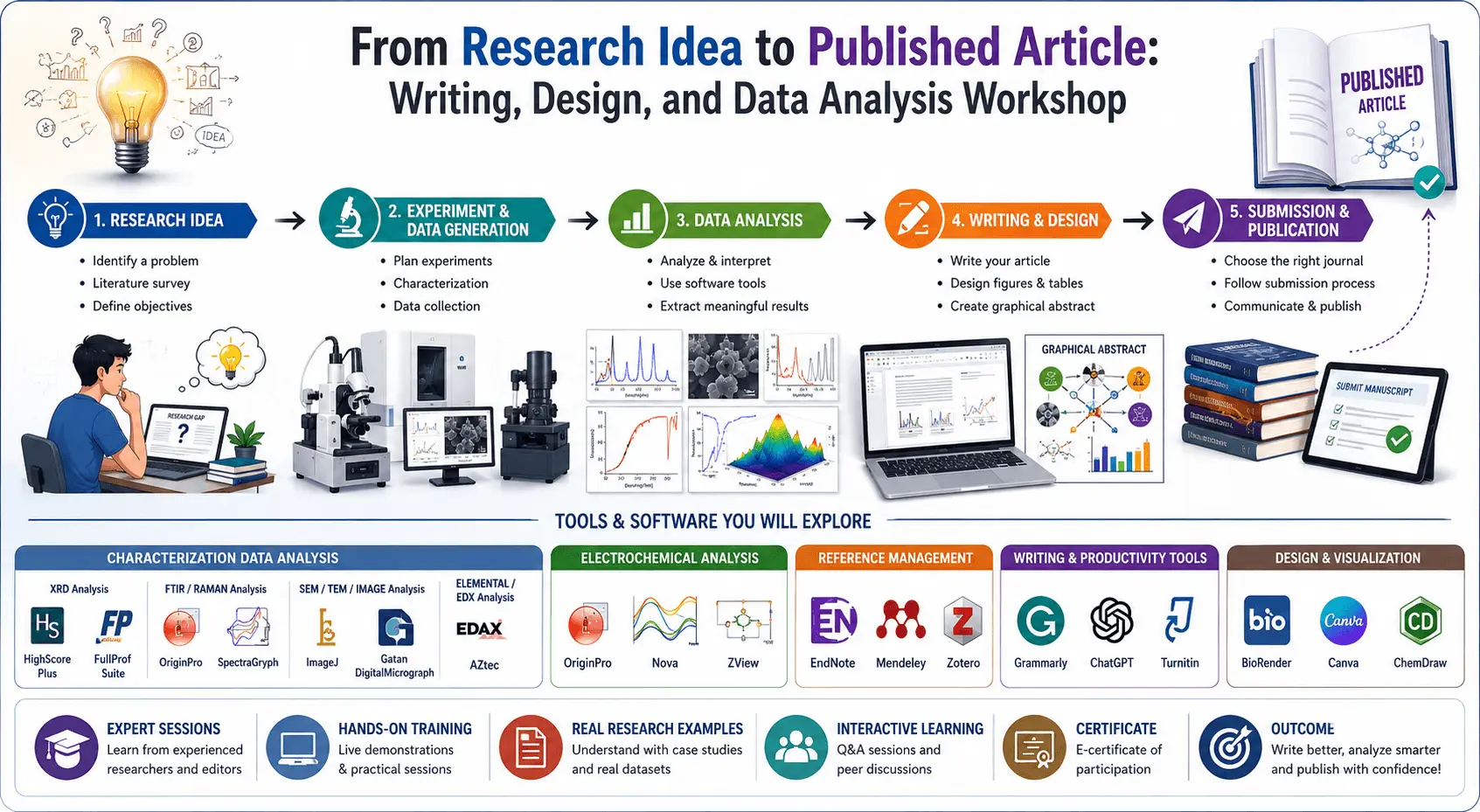
From Research Idea to Published Article: Writing, Design, and Data Analysis Workshop
Transforming Research Ideas into High-Quality Scientific Publications.
Jan 05, 2027 12:00
Jan 05, 2027 18:00
Dec 25, 2026 23:59
—
Online
Online
Workshop Chairs, Editors & Special Roles

Workshop Description
The workshop is designed to provide students, researchers, and early-career scientists with practical training on scientific article writing, research presentation, article formatting, and the use of modern characterization software commonly applied in engineering, materials science, chemistry, nanotechnology, and related research fields.
Many students perform experimental work but struggle to convert their results into a high-quality scientific publication. Common problems include poor article structure, weak graphical presentation, improper interpretation of characterization results, lack of software knowledge, plagiarism issues, incorrect citation formatting, and low-quality figure preparation. This workshop addresses these challenges through practical demonstrations and hands-on learning.
Participants will learn how to prepare a professional research article from title selection to final submission. The workshop will also introduce important characterization software used for XRD, FTIR, SEM, TEM, Raman, UV-Vis, electrochemical analysis, and graphical figure preparation. Special attention will be given to data interpretation, scientific visualization, publication ethics, AI-assisted tools, plagiarism reduction strategies, and journal submission processes.
The training combines theoretical explanation with practical demonstrations using real research examples. Students will gain exposure to modern software platforms, scientific databases, article formatting methods, and publication strategies used by researchers worldwide.
Objectives of the Workshop
- To train students in professional scientific article writing
- To improve understanding of article structure and publication standards
- To teach scientific figure and graphical abstract design
- To provide practical training on characterization software
- To help participants understand data interpretation techniques
- To introduce journal selection and manuscript submission procedures
- To explain plagiarism, citation ethics, and AI usage limitations
- To improve research communication and presentation skills
Target Audience
- Undergraduate Students
- Master’s Students
- PhD Scholars
- Research Assistants
- Early Career Researchers
- Faculty Members
- Engineering and Science Students
Major Topics Covered
1. Introduction to Scientific Research Articles
- Types of scientific articles
- Review articles vs research articles
- Short communication and conference papers
- Importance of research publications
2. Structure of a Scientific Article
- Title writing techniques
- Abstract preparation
- Keywords selection
- Introduction writing
- Methodology section
- Results and discussion
- Conclusion writing
- References and citation formatting
3. Scientific Figure and Article Design
- Professional graph preparation
- Figure resolution requirements
- Image editing standards
- Graphical abstract preparation
- Table formatting
- Journal template formatting
- Latex and Word formatting basics
4. Characterization Techniques and Data Interpretation
Materials Characterization Topics
- XRD analysis
- FTIR interpretation
- Raman spectroscopy
- SEM and TEM image analysis
- UV-Visible spectroscopy
- TGA and DSC basics
Characterization Software Covered
XRD Analysis Software
- HighScore Plus or MDI Jade
- FullProf Suite
- OriginPro
- VESTA
Topics
- Phase identification
- Crystallite size calculation
- Williamson–Hall analysis
- Rietveld refinement
- Peak indexing
FTIR and Raman Analysis Software
- OriginPro
- Spectragryph or eFTIR or Knowitall
Topics
- Functional group identification
- Peak assignment
- Bond vibration analysis
- Comparative spectra analysis
Microscopy and Imaging Software
- ImageJ
- Gatan DigitalMicrograph
Topics
- SEM image analysis
- Particle size distribution
- Morphology analysis
- TEM interpretation
Electrochemical Analysis Software
- Nova
- ZView
- OriginPro
Topics
- Cyclic voltammetry analysis
- GCD interpretation
- EIS fitting
- Specific capacitance calculation
- Energy and power density calculations
Research and Publication Tools
Reference Management Software
- EndNote
- Mendeley
- Zotero
Topics
- Citation insertion
- Automatic bibliography generation
- Journal style formatting
- Reference organization
AI and Modern Research Tools
AI-Assisted Research Tools
- ChatGPT
- Grammarly
- Turnitin
Topics
- Ethical use of AI in research
- Grammar improvement
- Plagiarism reduction
- Scientific paraphrasing
- Research productivity enhancement
Workshop Features
- Hands-on practical demonstrations
- Live software training
- Real research examples
- Scientific article templates
- Characterization data interpretation
- Publication guidance
- Interactive Q&A sessions
- Certificate of participation
Expected Learning Outcomes
After completing the workshop, participants will be able to:
- Write a professional scientific article
- Interpret characterization results properly
- Use research software confidently
- Prepare publication-quality figures and graphs
- Select suitable journals for submission
- Reduce common writing mistakes
- Improve research presentation quality
- Understand publication ethics and standards
Suggested Fields for the Workshop
- Materials Engineering
- Nanotechnology
- Chemical Engineering
- Physics
- Chemistry
- Energy Storage
- Environmental Engineering
- Biomedical Engineering
- Polymer Science
- Electrical Engineering
- Mechanical Engineering
- Data Analysis and Scientific Computing